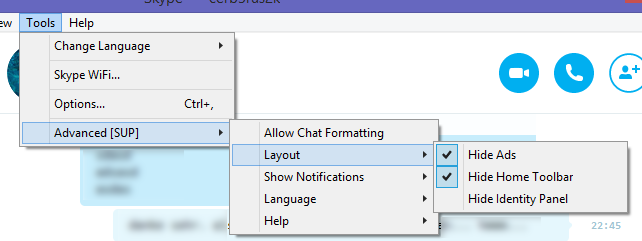
The Skype Utility Project (SUP) is an inofficial plugin for the Skype messenger application, providing a list of useful features and improvements.
This project started out as a small hack for my own private use, intended to address Skype’s inherent issues with displaying notification popups on a system with multiple monitors.
I was annoyed by the fact that Skype would display notification popups off-screen, since apparently those popups were not designed with multi-screen users in mind. So I wrote a small application that would use the Windows API to move Skype’s notification popups to a point that was actually on one of my screens. This worked quite well.
Some time later, Skype introduced a hugely controversial feature which would interpret asterisks and other characters within chat messages as formatting characters, which was kind of impractical when trying to send text containing these characters (e.g. code snippets). There was a way to disable this automatic formatting by entering a special command in the chat, but this had to be repeated every time you started Skype.
To solve this problem, Moritz Kretz wrote a small plugin of his own to automate the process. We then decided to combine our plugins, making them accessible to the public and integrating our plugin into Skype’s regular interface to make it easier to use.
After the plugin had gone public, we received a lot of positive feedback and several requests for new features, as well as contributions from other programmers.
SUP has since acquired multiple new features, such as hiding advertisements and removing other unnecessary clutter from Skype’s interface, and is available in three languages (English, German and Russian).
SUP is available on GitHub or via Chocolatey.